
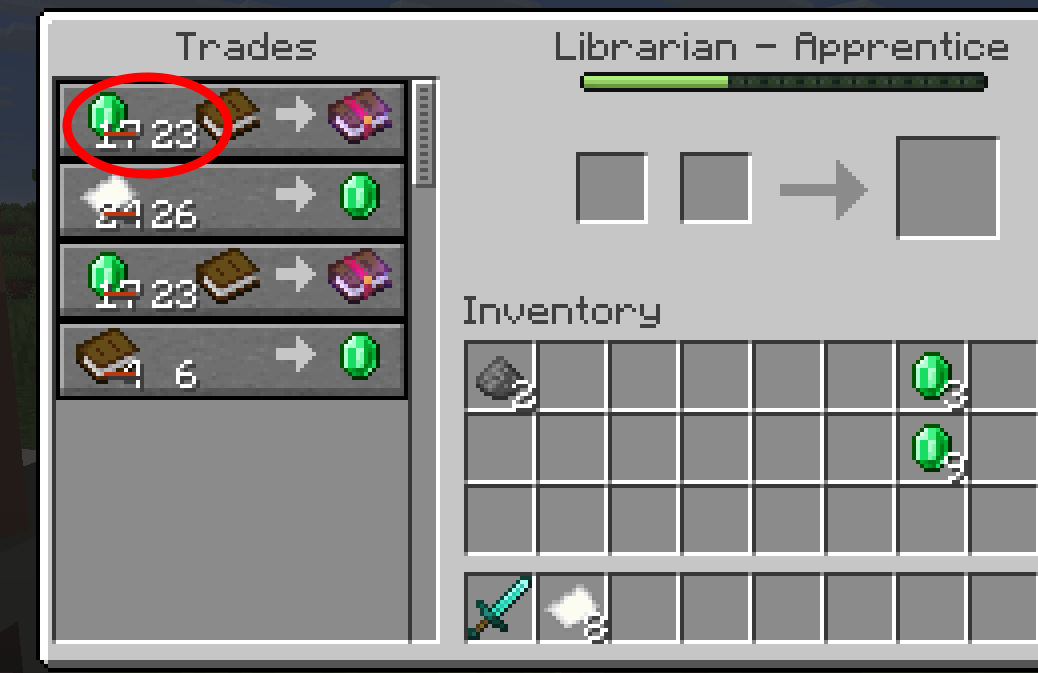
Villager prices increase in Minecraft when demand rises, your reputation drops, or discounts expire, a system often called “villager inflation.”
⚡ QUICK ANSWER
- Repeating trades too often raises prices due to high demand
- Low reputation causes villagers to charge higher trade prices
- Losing discounts or effects makes villager prices go back up
By managing these systems, you can keep villager prices low and avoid paying more than you need to.
New to trading? Start by learning how to find a village fast.
Why Villager Prices Increase
Villager prices change based on how you trade and interact with villagers. Over time, these systems can lead to villager inflation, where prices slowly increase if you’re not careful.
Over-Trading Raises Prices (Demand Mechanic)
Villagers track how often you use each trade. If you repeat the same trade too often, prices increase due to demand.

Each trade has a limited number of uses before restock. If you repeat the same trade too often, prices increase and the trade will lock until the villager restocks.
💡 Tip: Rotate trades instead of relying on one item.
Low Reputation Increases Prices
Villagers use a gossip-based reputation system. Bad actions increase prices across the entire village.
Actions that raise prices include:
- Attacking villagers
- Killing iron golems
- Causing harm nearby
Positive actions like trading and curing zombie villagers improve your reputation and lower prices. Reputation affects all villagers, not just one.
Harming Villagers or Iron Golems
Even small mistakes can increase prices. Hitting a villager causes a minor penalty, while killing an iron golem causes a much larger increase.
Because of the gossip system, these penalties can spread to multiple villagers at once.
Losing Discounts (Temporary Effects)
Some discounts are temporary and will expire.
Hero of the Village provides a short-term discount after raids. Curing zombie villagers gives large discounts, especially in Java Edition.

When these effects wear off, prices return to normal or higher levels.
How Villager Pricing Works
Villager prices are not fixed. They change based on how you interact with the system.
Prices are influenced by demand, reputation, restocking, and temporary effects. Because of this, prices can go up and down over time.
How Restocking Affects Prices
Villagers restock trades during work hours, usually twice per day. When they restock, locked trades reopen and prices may drop slightly.
However, restocking does not fully reset price increases caused by demand or reputation.
Villagers must also be able to reach their workstation to restock properly. If they cannot, trades may stay locked or stop working entirely. If that happens, see why won’t villagers trade in Minecraft.
Trade Lock-In and Base Prices
Once you trade with a villager, their profession and trades are locked in. The base price does not change.
However, the final price you pay can still increase or decrease depending on demand, reputation, and temporary effects.
How to Keep Villager Prices Low
Keeping villager prices low depends on demand, reputation, and discounts. If you ignore these, prices will slowly go up over time.
Prevent Prices From Increasing
Once prices are low, keep them that way with good habits.
- Rotate Trades: Using the same trade too often raises its price over time.
- Use Multiple Villagers: Spreading trades keeps any one villager from raising prices too fast.
- Avoid Negative Actions: Hitting villagers or iron golems will raise prices across the village.
Lower Prices Quickly
If prices are already high, you can bring them down fast.

- Cure Zombie Villagers: Curing zombie villagers gives big discounts and improves your reputation.
- Get Hero of the Village: Winning a raid gives the Hero of the Village effect, which grants temporary villager discounts.
Maintain Low Prices Over Time
Once prices are low, keep them that way with good habits.
- Let Trades Restock: Restocking prevents prices from rising again.
- Keep Villagers Safe: Villagers need to stay safe and available. See why villagers disappear in Minecraft.
- Spread Trade Demand: Using multiple villagers keeps prices stable. Learn how to breed villagers in Minecraft to create more traders.
Common Mistakes That Increase Villager Prices
Many players trigger price increases by mistake. Avoiding these will save you resources.
- Repeating villager trades too quickly
- Harming villagers or iron golems
- Ignoring reputation mechanics
These mistakes lead to higher prices and make them harder to lower again.
Frequently Asked Questions
Why do villagers suddenly raise prices?
Villagers raise prices due to high demand, negative gossip, or lost discounts.
How do you decrease villager prices?
To lower trade prices, improve reputation, cure zombie villagers, and reduce trade demand.
You can also use a no villager price increase mod to prevent villagers from increasing their prices after repeated trades.
How do you increase villager reputation?
You can increase villager reputation by trading regularly, curing zombie villagers, and defending the village during raids. Higher reputation leads to better prices.
How can you lower villager prices without using zombies?
If you don’t want to cure villagers, trade often, gain Hero of the Village, and avoid harmful actions.
How do you reset villager prices?
You can partially reset prices through restocking, but reputation must improve to fully lower them.
How long do villager price increases last?
Price increases last until demand drops or your reputation improves.
The villager price increase cooldown is not fixed, and prices go down after restocking only if you stop over trading.
Why are my cured villager prices going up?
Prices can rise again due to high demand or when temporary discounts wear off.
Do villager prices go back down after hitting them?
No. Hitting villagers creates negative gossip, which raises prices.
Do villagers raise prices if you kill another villager?
Yes. Killing a villager causes a large reputation penalty and raises prices.
Does curing a villager lower prices forever in Bedrock?
No. Curing gives strong discounts, but they do not stack or last forever in Bedrock Edition.